
01 Reward desk
Cloverlines Codes
Filter reported Cloverlines codes by the reward you want. Reports disagree on which still work, including SORRYFORDELAY. Check the in-game result to see what your account can claim.
Reports reviewed
How to redeem ↓Reported codes
8 codes-
Disputed
SORRYFORDELAY10 Crystal Mana -
Disputed
CREATORLIKE15 Crystal Mana -
Disputed
DEMONCONTRACT10 Crystal Mana -
Disputed
LIKETHEGAME130% XP boost for 30 minutes -
Disputed
NANIMOSUPREMETemporary XP boost -
Disputed
GameIsBack!15 Race Spins -
Disputed
SORRYFORSHUTDOWN3 Special Spins -
Disputed
RESETSTATS3 stat resets
Disputed means reports conflict or flag a code as possibly expired. Current redemption is unverified. Reward amounts are historical reports.
In-game steps
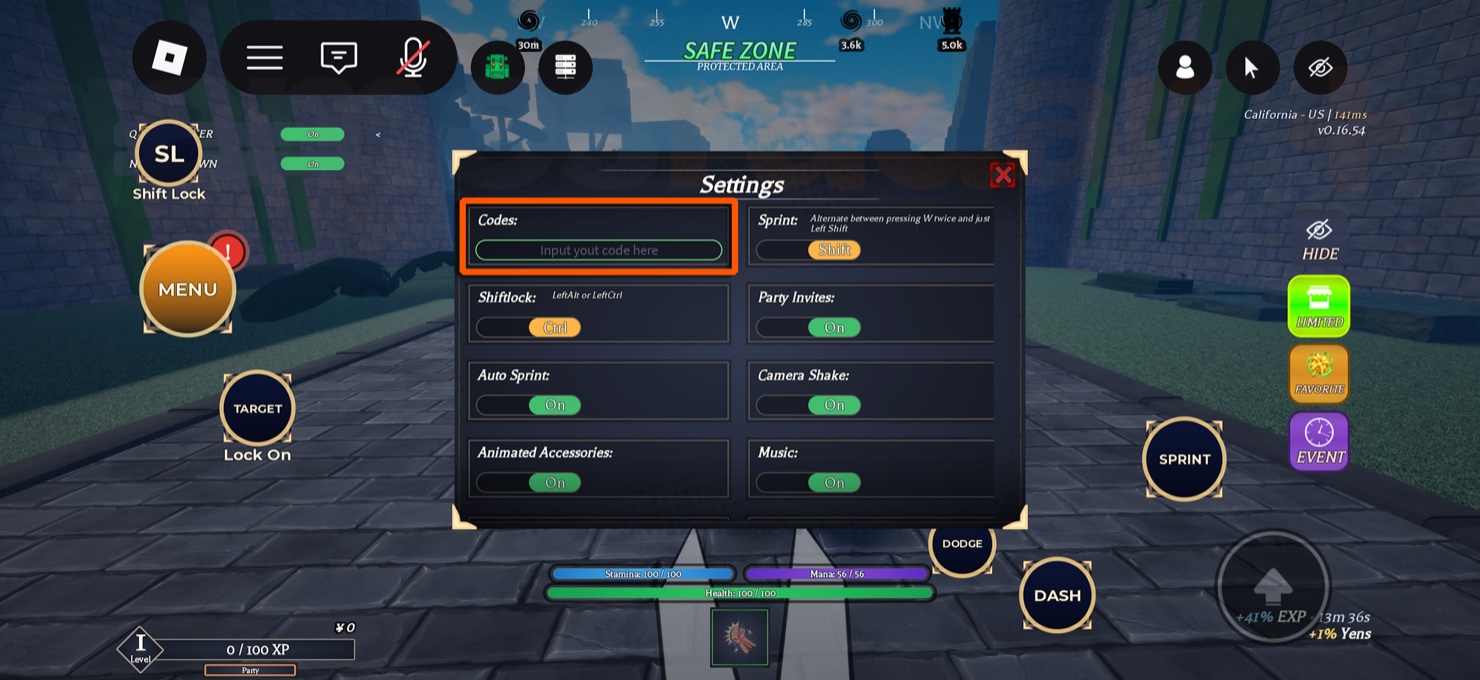
How to redeem Cloverlines codes
- Open the in-game menu. Enter Cloverlines on Roblox and click or tap Menu. On PC you can press M.
- Find Codes in Settings. Choose Settings and look for the text box near the upper left of the panel.
- Paste one code and submit. Use the exact string, including any punctuation. Press Enter on keyboard or submit through the on-screen input.
- Check the response. Look for a reward message, a change in the corresponding balance or spin count, or a boost timer for an XP code.
If a code fails
- Invalid or expired
- Check for an extra space or missing punctuation. If the exact string still fails, check the latest announcement in the official Discord.
- Already claimed
- Check the relevant balance or reward timer on that account. Copying the code on this page only places text on your clipboard.
- No response
- Make sure the text is in the Codes input inside Cloverlines Settings and submit again. Read the game message before trying another code.